
Search the Community
Showing results for tags 'user interface'.
Found 3 results
-

tool Fallout 4 Crash Log Auto Scanner And Setup Integrity Checker (CLASSIC)
TheSoundOfSnow posted a file in Tools & Utilities
Version 7.20
7 downloads
A simple tool for scanning your Buffout 4 crash logs, game and mod files. Automatically detects problems in around 250 different cases. GUI included. Previously known as Crash Log Auto Scanner (CLAS) This tool is based on How To Install Buffout 4 And Resolve Crash Logs article. It automatically scans Buffout 4 crash logs and gives you detailed information on detected settings and mods that might be causing the crash, along with additional steps to take depending on what it finds. Currently implemented logic checks for ~250 different things. CLASSIC can now also extensively scan game and mod files for additional problems. REQUIREMENTS - Buffout 4 OR Buffout 4 NG - Fallout 4 Script Extender - Address Library For F4SE Plugins - OR Address Library For F4SEVR Plugins - BSArch (For Scanning Mod Files) ADDITIONAL FEATURES CLAS has evolved into: Crash Log Auto Scanner & Setup Integrity Checker Here are most of its main features (and there's plenty more): - Automatically checks for its own updates every 7 days. - Automatically grabs all crash log files from the Script Extender folder. - Plays a notification sound once crash logs and game file scans are done. - Checks if the game is installed outside of Program Files folder. - Checks if Buffout 4 and its requirements are correctly installed. - Warns you if MS OneDrive is overriding your Documents folder location. - Checks if you have the latest version of Fallout 4 Script Extender (F4SE). - Checks if any F4SE files are corrupted or overwritten by other mods. - Checks if F4SE files and scripts are correctly installed. - Automatically enables Archive Invalidation / Loose Files setting if necessary. - Automatically adjusts Buffout4 TOML settings to prevent mod conflicts and crashes. - Automatically adjusts INI settings for some mods to prevent crashes & various problems. - Papyrus Log monitoring built into the GUI and plays a warning sound when things go bad. - Checks for conflicts between mods and available mod patches or solutions to problems. - Buttons for quick access to many other useful Fallout 4 tools, articles and websites. - Ability to scan all mod files from your Staging Mods Folder to detect these issues: > Check if DDS texture file dimensions are not divisible by 2 (Ex. 1024 x 1025) > Check if texture files are in the wrong format (TGA or PNG instead of DDS) > Check if sound files are in the wrong format (MP3 or M4A instead of XWM or WAV) > Check which mods have precombine / previs data (so you can load them after PRP) > Check which mods have animation file data (to narrow down Animation Data Crashes) > Check which mods have copies of Script Extender files (to prevent problems & crashes) - Mod files scan will also move any found fomod and readme files to CLASSIC Misc folder. - You can also generate FormID values for all your active mods, so AUTOSCAN can show them. - AUTOSCAN reports will additionally provide the following information: > Check and show if you have the latest version of Buffout 4 > Notify you when most Buffout 4 TOML fixes get changed or disabled. > Warn you when TOML settings need changes to prevent conflicts and crashes. > List all mods that can frequently cause crashes or other problems. > List all mods that have community patches and fixes available for them. > List all mod INI files and settings that have enabled game *VSync*, if any. > Show the Plugin Checker report analysis from Wrye Bash if it's available. > Warn you if *Fallout4.ini, Fallout4Prefs.ini or Fallout4Custom.ini* become corrupted. > Warn you if there are any errors in the Script Extender and all other mod log files. > Show how many times each Possible Plugin and FormID Suspect appears in the crash log. > Show how many times each detected record (file, function) appears in the crash log. > Show an additional warning if you went over the Plugin Limit (254 esm/esp). INSTRUCTIONS 1.) Download the CLASSIC Portable main file from Files tab and extract it somewhere. 3.) Run the executable, press the SCAN CRASH LOGS button and wait until it's complete. 4.) Open the autoscan results generated in the same folder that end with -AUTOSCAN(.md). 5.) Profit. (Read the -AUTOSCAN files and do what they say. Beware of false positives.) 6.) Press Scan Game Files button to perform additional mod and game file integrity checks. NOTICE: CRASH LOG FILES MUST START WITH "crash-" and HAVE THE .log EXTENSION, NOT .txt (Buffout logs in Documents\My Games\Fallout4\F4SE are already .log, do not rename them.) (For everything else, enable extensions in Windows Explorer and rename files if necessary.) READ THE PINNED POST FOR TROUBLESHOOTING AND INSTRUCTIONS If Auto-Scanner doesn't resolve your woes, upload crash logs to the Buffout 4 Nexus Page Any suggestions on how to improve the script are quite welcome. And enjoy, I guess. -
Version 1.0.0
6 downloads
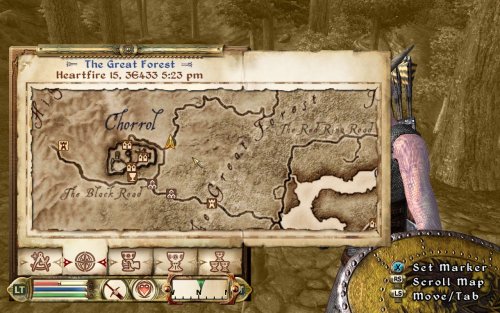
Description A small tweak to NorthernUI's Vanilla-style preset that makes the map cursor move faster. I made this preset for use on Steam Deck, because I found NorthernUI's default cursor speed to be very slow on it. Installation Overwrite NorthernUI's ini file with the one found here. Or, tweak the ini yourself and change fMapMenuPanSpeed from 4 to 12. NorthernUIAway is required for this mod to work, as this mod only contains the ini file. Requirements Northern UI - NorthernUI Away Nexus Oblivion Script Extender xOBSE Nexus | Silverlock (Required for NorthernUI) Permissions & Credits NorthernUI was developed by DavidJCobb. Everything in this ini file that was not written by me belongs to the mod author. The mod author has allowed for modification & reupload of the mod with credit. Monetization & rewards are not permitted. I allow for modification & reupload of this file, but make sure to credit the mod author. NorthernUI License Mirrors Nexus -
Here are a few modifications that caught my attention. And they are not done by using TESVSnip aka FalloutSnip. Full Dialogue Interface Better Item Sorting ( It has a patch for the Full Dialogue Interface ) PipWare UI Fallout4 Edition ( Great stuff interface settings in the XML ) My settings for version 0.6 Improved Map with Visible Roads Fallout Texture Overhaul PipBoy


Support us on Patreon!