Jump to content

1 Screenshot

About This File

Like this mod? Use it a lot? Please consider joining my Patreon. Thanks!

Play on the XBox? This modular version is now available on Bethesda.net for XB1! Since all of the modules (not the core mod, but the plugin modules) are .esl, they shouldn't even count against your mod limit! Bethesda.net | Gruffydd's Signs and Posters - Modular Mod

NewBackground2.thumb.png.dd11ef94fcca51eba9431d39c8232a08.png

Welcome to the new and improved Gruffydd's Signs and Posters!

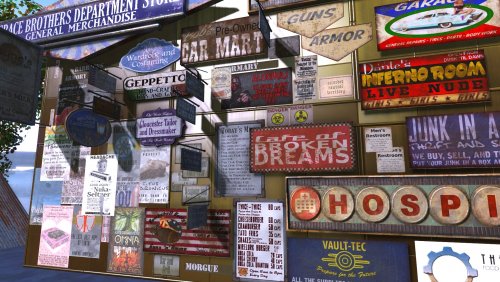
GS&P is a Fallout 4 mod that adds more than 900 custom signs, posters, and a few other items, all available in your settlement menus.

You'll also get every vanilla sign or poster I could find, now merged in with GS&P. Formerly, these were in the Signs of the Times add-on mod. Those signs and posters, along with a bunch more newly added, are now all in one plugin for this mod.

So how does it work?

GS&P is now in modular format. This means that you will need the base mod (GruffyddSandP), and then can pick and choose which of the plugins you want to add on. All of the plugins are flagged as .esl, so they won't count against your mod limit.

Just choose the ones you want, along with the base mod. Be sure to install SMM (Settlement Menu Manager) first, though, as this mod uses SMM to add a separate menu, with the stuff inside sorted into different subfolders to reduce scrolling and make it easier to find objects.

Some of the plugins are chock full of stuff, others not so much. It was designed to be expanded later, as I have time to create more stuff. This especially applies to the different factions. Right now the only one I've done a lot on is the Minutemen, but others will come later.

What plugins are included?

Added Settlements - New settlement signs - generic, BoS, Institute and Minutemen - for more than a score of new non-vanilla settlement locations. These are locations that are either obvious choices or ones that were specifically requested, and are for use with mods that add new settlement locations or that allow you to select or create your own.

Businesses - Contains everything that relates to a place of business that isn't included in another category.

ChurchGraveHolidays - A catch-all for anything that might include religious stuff. Churches, graveyards, posters related to holidays, that kind of thing. I got a request from someone a while back to add some items for their religion because it was so underrepresented (as in non-existent) within the vanilla game. I did, and also added in a couple of items for other religions. If you want something added, let me know. If the whole thing offends you, just don't use this module.

Community - All of the community assets, things that a settlement would see as a common resource. Things like schools, a community greenhouse, a community pool, a crafting hall, and a community notice board.

Entertainment - All things entertaining. Music, movies, clubs, billiards, and so on.

FactionsBrotherhood - Everything relating to the Brotherhood of Steel.

FactionsInstitute - Everything relating to the Institute.

FactionsMinutemen - Everything relating to the Minutemen. In addition to generic stuff, there are items added to support three different visions of the Minutemen. The first is a benevolent communal effort, where everyone pitches in to help create a better wasteland. Optimistic if possibly naive. This is what Preston seems to be wanting, as far as I can tell. The second is a militia, organized along military lines. It's there to protect people and settlements and to fight off or eliminate threats. Everything else is up to the settlers to deal with. This is more like what the pre-Quincy Minutemen were, like the ones at the Castle. The third is a dystopian version, where the Minutemen are just as corrupt as any of the "bad guy" factions. The General rules with an iron fist, and dissidents vanish in the middle of the night, taken for "re-education".

FactionsRailroad - Everything relating to the Railroad.

FactionsOther - Anything that's a faction that's not one of the "big four". This includes raiders, atom cats, enclave, gunners, and so on. Right now this is very sparse, but I'll add stuff later, especially if anything specific is requested.

FoodAndDrink - If it relates to food or drink production or distribution and doesn't fit in one of the more specific plugins (ex: Community Greenhouse) it's in here.

GenericAndMiscellaneous - All of the generic signs and other stuff that didn't fit in any of the other categories.

GenericSettlements - All of the settlement signs that aren't affiliated with a faction. If you want the faction versions, they're in the faction plugins.

Graffiti - Various images and text designed to be "spray painted" onto a wall or similar surface. Includes a craftable spray paint object that is needed to make any graffiti. Don't worry, it's easily crafted.

LawAndSafety - Everything related to law and safety. Police/sheriff stuff, warning signs, signs welcoming or warning off certain types of people, that kind of thing.

Lodging - Anything that relates to a place where you can stay. Mostly hotels and motels.

Vintage - Real-world stuff old enough to be out of copyright that doesn't fit in one of the other categories. At this point, it's all WWI and WWII propaganda posters that I thought would go well with the overall theme of the game, set up to look worn and faded.

In addition, there are three other plugins that are "finished", in that I don't expect to be updating them.

SignsOfTheTimes - All the stuff from the old Signs of the Times mod, plus a bunch of other vanilla signs and posters that I found and added. If you're looking for a vanilla sign or poster, it's probably in here.

VegaOne - All of the stuff designed by guest artist VegaOne.

MurkwaterOil - All of the stuff created for a specific build someone wanted to make at the Murkwater settlement location.

Pick the ones you like, leave out the ones you don't. It's that easy.

What do I need to do to install it?

NMM Community Edition: Use the Install From File function (a yellow puzzle-piece looking thing on the left side of your screen).

Vortex: Drop it into the area at the bottom for manually installing mods.

MO2: I don't use it myself, but I've had reports that people using the current version of MO2 have had no problems with manually installing this mod. If you for some reason do, please try a completely manual install (placing the files where they need to be manually, without using MO2, then activating the mod in MO2 once everything is where it needs to be).

Something Else: Heck if I know. There's all sorts of stuff out there, I guess. Read the manual for your mod organizer, and see what it says about manual installs.

No matter how you install it, you will need Settlement Menu Manager (SMM) for this to work, so install that first! Be sure to follow the installation instructions for SMM, or it might not load the mod correctly!

A few addendums:

1) There are probably a few items that are in the wrong category. If you notice one, please let me know. I'll move any identified to their proper location when I get the chance.

2) I haven't figured out how to pack these as ba2 yet. All the tutorials make it sound easy, but it just doesn't want to work for me, and I have no idea what I'm doing wrong. If anyone has a tutorial that shows explicitly how to do it, and is willing to share it, I would love to see it. For the time being, these are all loose files (just as has always been the case with GS&P).

3) If there's something you'd like to see added, ask. I may not include everything requested, but if it appeals to me or sounds like a reasonable addition, I'll see what I can do. All that I ask is to please be specific. Don't say "can you add more Enclave stuff". Ask for specific items.

This mod has taken many, many hours to make, and future updates will take many, many more. If you enjoy this mod and feel like saying thanks by buying me a beverage, or just chipping some cash my way, please check out my Patreon, which you can get to with the link in the icons below. It's pretty bare bones, because I spend my creative time here on the mod, not on Patreon, but know that if you do choose to support me, it's greatly appreciated!

image.png.f2bb838c90ac20a3fc22c57a2f61c64f.png   <-- Click these for my Patreon. The one at the very bottom of the page is for AFKMods itself. Thanks!

Thanks!


What's New in Version 5.1.2

Released

Added the Graffiti module, which I apparently never actually uploaded before.

Please let me know if you run into any problems with it. Thanks!


Permission Grants

General Permissions: No permissions are granted to use this mod in whole or in part in any other work, unless permission is specifically given by me in writing as an exception to this policy.
X-Box 1 Permissions: No permissions are granted to port this mod to X-Box 1, because I've already done it.


User Feedback

Recommended Comments


Gruffydd

Posted

Just to clarify, it was only the three signs in the one post that I was not able to duplicate the problems with.

The Tiki Motel sign *is* legitimately broken, and I need to fix it. But the other three (the posts for the Institute signs, the one MM settlement sign, and the Ministry of Order sign) all worked on my game.

ninalyn

Posted

16 hours ago, Gruffydd said:

Sorry for the delay on the response, it's been a rough month. I finally had a chance to check on those missing textures. I did it by installing my mod on my new computer for the first time by downloading it from the site here like anyone else would.

All three of the problem signs worked perfectly.  I'm at a loss as to what to tell you, I was unable to duplicate the issue. I tried to take a screenshot to show them all working in my game, but I'm using the GOG version (because I'm playing Fallout London), and haven't figured out where it saves them.

My recommendation would be to reinstall the problem modules, which in this case would be Factions - Minutemen and Factions - Institute. For what it's worth, I used Install From File on the Nexus Mod Manager - Community Edition.

Sorry I couldn't be more help, but honestly it's working fine for me.

I've run into this before, but just doing a redownload fixed the issue (I think you actually walked me through that, ages and ages ago, because this was the first mod I'd downloaded from a place that wasn't Nexus or Bethnet). Might be worth giving that a shot?

Gruffydd

Posted

On 6/3/2024 at 8:19 PM, Shannanigan said:

Hey there... I downloaded your mod tonight and its great!

But one thing popped up on several items... this pink texture of doom!
I believe this happens when textures are missing, wondering if the recent update is the problem.

Of course it might be a conflict mod, but just in case I thought I'd share.

2024-06-03 20_06_37-Fallout4.png


I know it's been forever, but I finally had a chance to look into this. As expected, it was something simple and stupid, a typo on my part.

In the Materials file, the path points to the folder Lodgings instead of Lodging.

I haven't had time to prepare a new version with this and other fixes yet (as I haven't tracked down the other issues yet), but attached is the fixed Materials file for this object. If you drop it into the folder and replace the old one, it should fix this sign.

TikiMotel.bgsm

E. L. Knight

Posted

Hi. I installed your mod today and it shows up on the workshop, but when I got to the menu, the signs/objects are all invisible and don't show. Any idea what might be wrong?


I mostly using bethesda.net mods for my PC (I have had a nightmare time trying to use MO2 and manually install mods.?


I had to manually install your files, the menu shows up, but no signs or objects are present. There is simply just a blank space.

Gruffydd

Posted

4 hours ago, E. L. Knight said:

Hi. I installed your mod today and it shows up on the workshop, but when I got to the menu, the signs/objects are all invisible and don't show. Any idea what might be wrong?


I mostly using bethesda.net mods for my PC (I have had a nightmare time trying to use MO2 and manually install mods.?


I had to manually install your files, the menu shows up, but no signs or objects are present. There is simply just a blank space.

My first guess would be that one or more folders are in the wrong places.

If you're still unable to get it to work, you might try installing it with a different mod manager. I use the NMM community version, and it's basically drag and drop there.

E. L. Knight

Posted (edited)

17 hours ago, Gruffydd said:

My first guess would be that one or more folders are in the wrong places.

If you're still unable to get it to work, you might try installing it with a different mod manager. I use the NMM community version, and it's basically drag and drop there.

Hey, I got it work!

It was actually user error. I forgot a step. 

Edited by E. L. Knight
Your Local Fallout Fan

Posted

when you say base mod "GruffyddSandP" what do you mean? which mod? or is this the base or smth. Im pretty new to this website. I normally use Nexus

Gruffydd

Posted

4 hours ago, Your Local Fallout Fan said:

when you say base mod "GruffyddSandP" what do you mean? which mod? or is this the base or smth. Im pretty new to this website. I normally use Nexus

When you download it here, there are a bunch of different files. The main file is called GruffyddSandP. You have to have that one. All of the others are themed plug-ins. You need at least one of them, but can use - or ignore - any of the others. For instance, if you're doing a BoS playthrough you might not need any of the Minutemen stuff. You can choose not to install the Minutemen plug-in.

All of the plug-ins are listed here in the mod description.

Your Local Fallout Fan

Posted (edited)

4 hours ago, Gruffydd said:

When you download it here, there are a bunch of different files. The main file is called GruffyddSandP. You have to have that one. All of the others are themed plug-ins. You need at least one of them, but can use - or ignore - any of the others. For instance, if you're doing a BoS playthrough you might not need any of the Minutemen stuff. You can choose not to install the Minutemen plug-in.

All of the plug-ins are listed here in the mod description.

Thanks! I really needed this for my settlements! if I have a different problem I'll ask later. also do I just drop the plugins into the main file? then I just install by dropping in that one big file into via vortex? or is there anything else.

Edited by Your Local Fallout Fan
Bridges1120

Posted

Am I painfully blind or is there not a Commonwealth Weaponry sign? I decided for fun that in my current run rather than try to make new, unique stores in most of my settlements I was going to "franchise" with the ones in Diamond City - I found Swatters, Mega Surgery Center, Chem-I-Care and even the Super Salon but CWW seems to be escaping my eyes

biff2.0

Posted

I came from nexus, created an account on here all for this mod and only this mod. It adds so much immersion to the game that it feels barren with out it. 

Thank you.

Huxen_

Posted

Recently I downloaded this, put the files properly and had the prerequisites but the signs don't show up, I have then in my build menu and there invisible, I double checked I put all files in the right folder and even redownloaded them but still did not work, any way to fix this.

Gruffydd

Posted

2 hours ago, Huxen_ said:

Recently I downloaded this, put the files properly and had the prerequisites but the signs don't show up, I have then in my build menu and there invisible, I double checked I put all files in the right folder and even redownloaded them but still did not work, any way to fix this.

Does the menu show up and the objects don't,  or does the menu itself not show up?

Did you install the base mod and at least one of the plugins?

Huxen_

Posted (edited)

9 hours ago, Gruffydd said:

Does the menu show up and the objects don't,  or does the menu itself not show up?

Did you install the base mod and at least one of the plugins?

it does show up and the objects don't, plus i do got he plug ins NMM Community Edition and settlement menu manage

Edited by Huxen_
Gruffydd

Posted

9 hours ago, Huxen_ said:

it does show up and the objects don't, plus i do got he plug ins NMM Community Edition and settlement menu manage

Does it show the submenus? Or is the main menu for the mod empty?

Does it show item names but not the graphic in the menus? Or are the menus empty?

Huxen_

Posted

2 hours ago, Gruffydd said:

Does it show the submenus? Or is the main menu for the mod empty?

Does it show item names but not the graphic in the menus? Or are the menus empty?

It shows in the mod load order, it shows on the build meu but the graphics and the signs when i try to build them are not there, like there invisible even though it shows the object name how much it costs but not what it looks like or what it is

Gruffydd

Posted

25 minutes ago, Huxen_ said:

It shows in the mod load order, it shows on the build meu but the graphics and the signs when i try to build them are not there, like there invisible even though it shows the object name how much it costs but not what it looks like or what it is

Did you install manually or with a mod manager? If the latter, which one?

Offhand it sounds like the texture files ended up in the wrong spot.

Huxen_

Posted

On 8/13/2025 at 3:17 AM, Gruffydd said:

Did you install manually or with a mod manager? If the latter, which one?

Offhand it sounds like the texture files ended up in the wrong spot.

I redownloaded it manually followed all steps now it won't activate even when I have SMM it won't let me enable it

Gruffydd

Posted

24 minutes ago, Huxen_ said:

I redownloaded it manually followed all steps now it won't activate even when I have SMM it won't let me enable it

If it won't let you enable it, that sounds like that's not a mod issue, that's a mod manager issue. Which one are you using?

Huxen_

Posted

2 minutes ago, Gruffydd said:

If it won't let you enable it, that sounds like that's not a mod issue, that's a mod manager issue. Which one are you using?

Vortex

Gruffydd

Posted

1 hour ago, Huxen_ said:

Vortex

Any Vortex experts here who can help them troubleshoot their install?

Queen_Lacina87

Posted

What Folder do you put the file in vortex isn't allowing me to drop it?? 

the Dragon

Posted

I've been using this mod for years now and I love it! It's always in my load order, so thanks! 

Screenshot20.png

Omegacron

Posted

I'm starting a new playthrough and have the latest and greatest GSnP installed. It looks like the menu organization has changed, though - lots of things are different categories than what I remember. I'm looking specifically for the signs like Sturge's Repair Shop, Mama Murhphy's psychic readings, and Vault-Tec guy's store. I wanna say there was a sign for Codsworth running a haberdashery. Does anyone know offhand where those are located now?

Gruffydd

Posted

1 hour ago, Omegacron said:

I'm starting a new playthrough and have the latest and greatest GSnP installed. It looks like the menu organization has changed, though - lots of things are different categories than what I remember. I'm looking specifically for the signs like Sturge's Repair Shop, Mama Murhphy's psychic readings, and Vault-Tec guy's store. I wanna say there was a sign for Codsworth running a haberdashery. Does anyone know offhand where those are located now?

Some of those are in Vega One. Others are probably in Businesses.


Create an account or sign in to comment

You need to be a member in order to leave a comment

Create an account

Sign up for a new account in our community. It's easy!

Register a new account

Sign in

Already have an account? Sign in here.

Sign In Now
×
×
  • Create New...